Appearance
The entity page
/entities/:id — everything Verity knows about one merchant. The densest screen in the product, so it is worth knowing what each section is for.
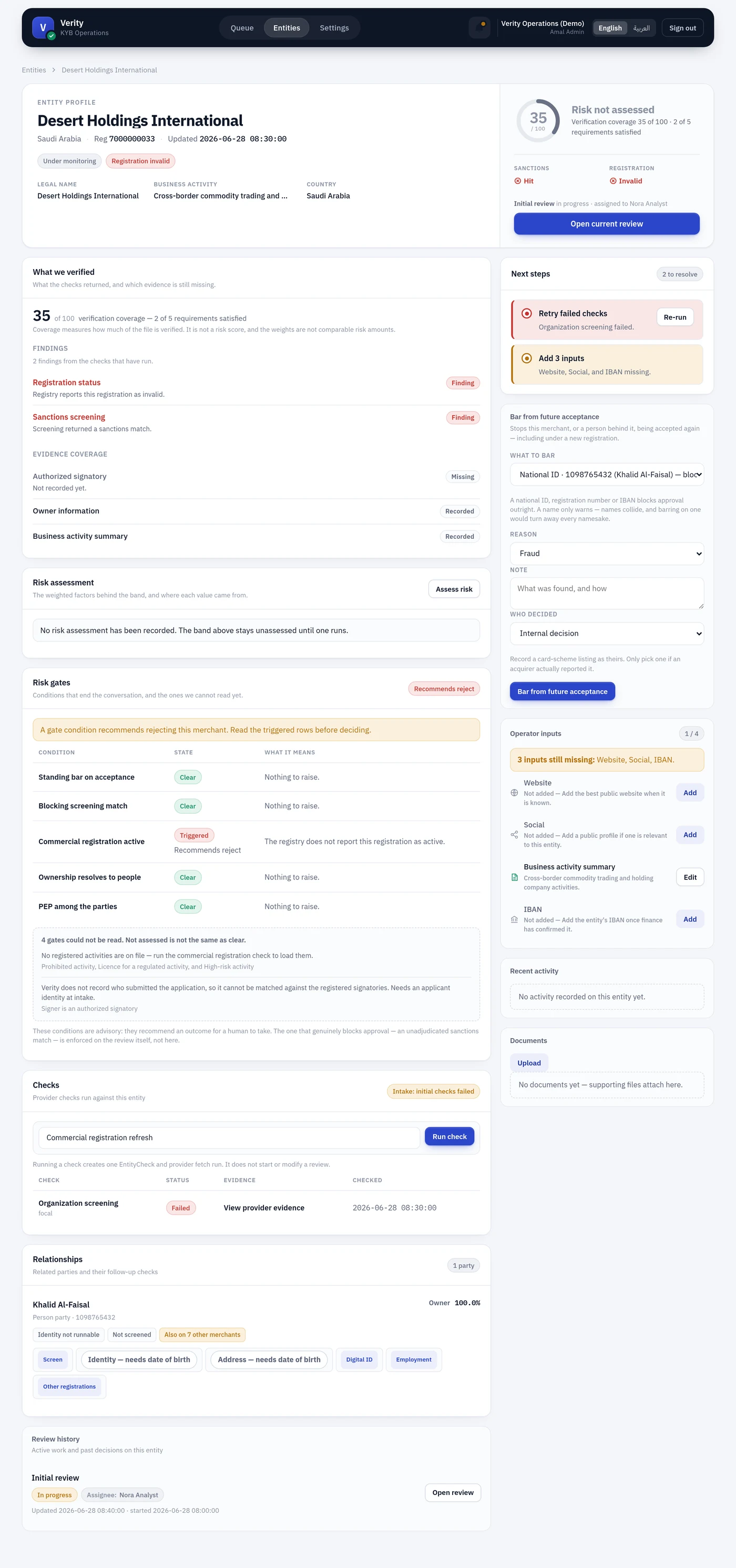
Standing header
The verdict strip. Identity on the left, standing on the right.
| Element | Means |
|---|---|
| Status and registration chips | Lifecycle state, and what the registry says about the registration |
| Legal name / Business activity / Country | The three facts you need to know who this is |
| Gauge | Verification coverage out of 100 |
| Band | The assessed risk band, or Risk not assessed |
| Sanctions / Registration signals | The two highest-consequence check outcomes, at a glance |
| Call to action | Open current review, Start review, or an explanation of why neither is available |
If no review can be started, the header says which intake posture is blocking it rather than showing a disabled button with no explanation.
Left column — the evidence
Standing bar on acceptance
Appears only when this merchant, or a person behind it, matches a standing bar — and when it appears it leads the column, above everything else. Somebody already decided; reading the rest of the file first wastes your time.
The chip says which it is: Approval blocked for a strong identifier match (national ID, registration number, IBAN), or Check who this is for a name match, which collides innocently and blocks nothing.
What we verified
Coverage and findings. Splits into two groups that are easy to conflate:
- Findings — something adverse was found. The only rows that earn risk colour.
- Evidence coverage — what is recorded and what is missing. A gap in our file, not a finding about the merchant.
A rule reads Clear, Finding, Not checked, Recorded or Missing — never a bare "Fail", which would collapse we found something and we never looked into one word.
Risk assessment
The weighted factors behind the band: each factor's observed value, its source, its score and its share of the weight. Assess risk runs a new one.
Two labels to know:
- Fallback score — no evidence stood behind this — the score came from the
no_inputfallback. Rendered in slate, not a risk colour. - Capped at neutral — a weak source tried to lower the score and was stopped.
If too much of the score rests on fallbacks, no band is published and the section says so. See Evidence threshold.
Risk gates
Conditions that end the conversation. Gates that were read appear in the table as Clear or Triggered. Gates that could not be read are grouped beneath under the cause they share:
4 gates could not be read. Not assessed is not the same as clear.
Gates are advisory — they recommend an outcome. The one condition that truly blocks approval, an unadjudicated sanctions match, is enforced on the review.
Registered activities
What the commercial registration says this merchant may do, resolved against the ISIC vocabulary and this country's activity rules. Flags prohibited and high-risk activities, and names the regulating authority for licensed ones.
Checks
Every provider check run against the entity, with status, evidence link and timestamp. The dropdown runs a new one. Running a check does not start or modify a review.
Cost of checks
What this merchant's provider calls have cost, including retries and failures — a retry is a second invoice.
The caveat travels with the total rather than sitting below it: when some calls have no published rate, the section says so in the same breath, because a bare number is believed and this one is wrong in the reassuring direction.
4 of 11 provider calls have no published rate, so this total is a floor and not the whole cost.
An entity with no calls yet shows a neutral No calls yet, not a green 0.00 SAR. See what a call costs.
Relationships
The people and organisations attached, with ownership percentage and role. Person cards carry the follow-up check buttons: Screen, Identity, Address, Digital ID, Employment, Other registrations.
Which buttons appear depends on the merchant's country. A check with no provider there is not shown at all, and the boundary is named once for the card — a Bahraini party is offered screening only, since Elm does not operate in Bahrain and Wathq is the Saudi registry.
A button reading Needs date of birth is a different thing: the check is owed and an input is missing, so it stays visible and links to the person page. See when a check cannot run for why those two are kept apart.
Review history
Active work and past decisions.
Right column — the work
Next steps
The single most useful panel: what to resolve, in order, each with the action that resolves it. If it is empty, nothing is outstanding.
Bar from future acceptance
Sits with the actions rather than among the evidence, and only appears where it can be acted on — you have denylist.manage, and no strong bar is already in force.
You pick an identifier rather than typing one, and the option carries the value, whose it is, and the consequence: National ID · 1098765432 (Khalid Al-Faisal) — blocks approval. Typing would allow a value paired with the wrong type, which places a bar that silently never matches — a bar that looks placed and does nothing.
Operator inputs
The four fields Verity cannot obtain from a registry — website, social, business activity summary, IBAN — with inline editing and a count of what is missing.
Recent activity and Documents
Recent activity is what has happened to this merchant: details edited, documents uploaded, checks run, provider updates, and the decisions taken on its reviews. Newest first, with the operator who did it — or System where a job or a provider webhook did.
The heading links to the full history. That page needs entity.activity.view of its own, because it names every colleague who touched the merchant and every value they changed. The latest ten stay here under entity.view, since a reviewer who cannot see what was just done to a record cannot judge it.
Documents holds supporting files. Types a browser renders safely open inline; everything else downloads.
An unassessed entity
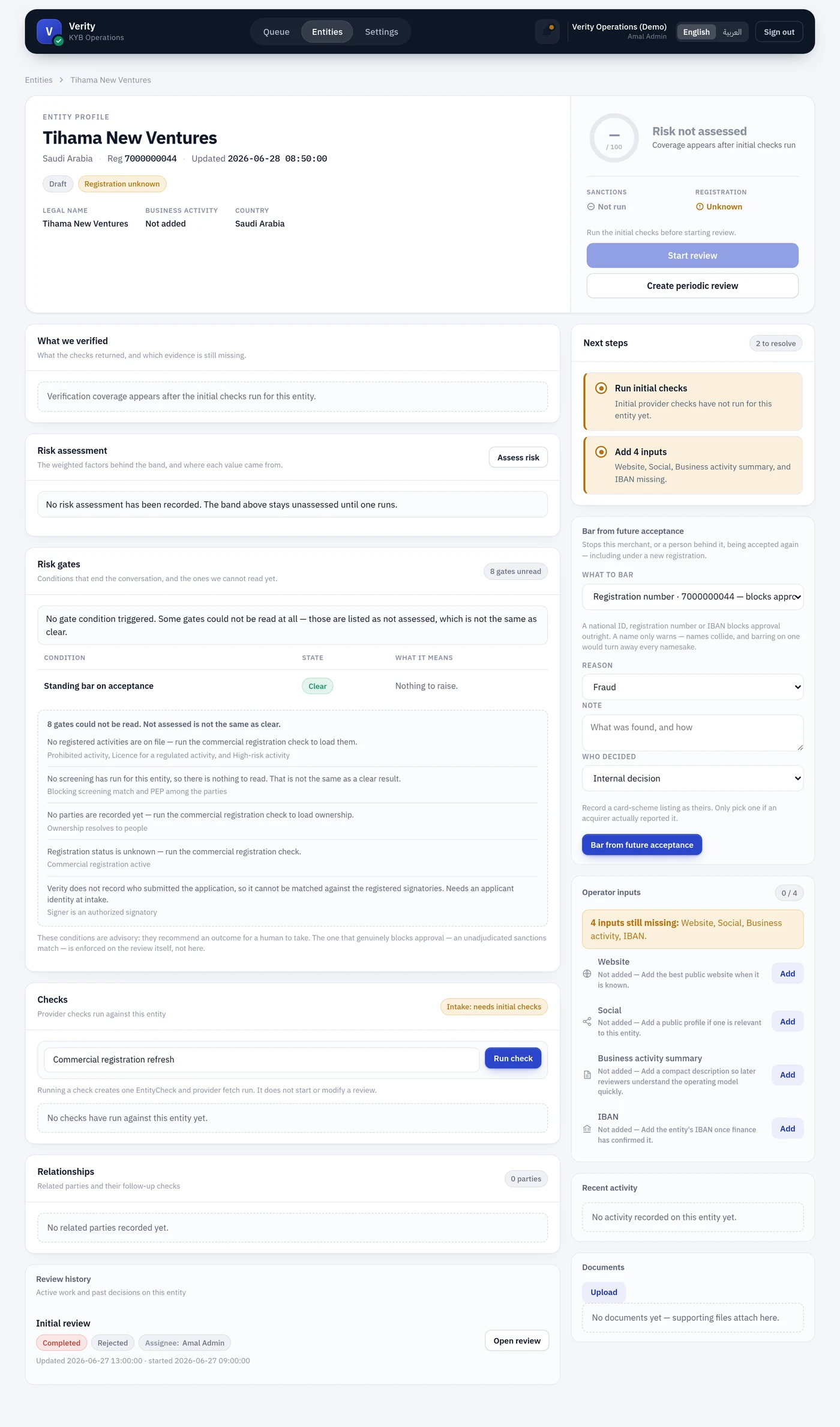
A new merchant shows the honest version of every panel: no coverage, Risk not assessed, gates that could not be read, and Next steps listing the initial checks. Nothing here is a failure — it is a file nobody has worked yet.