Appearance
The entities list
/entities — the account's merchants, and where most sessions start.
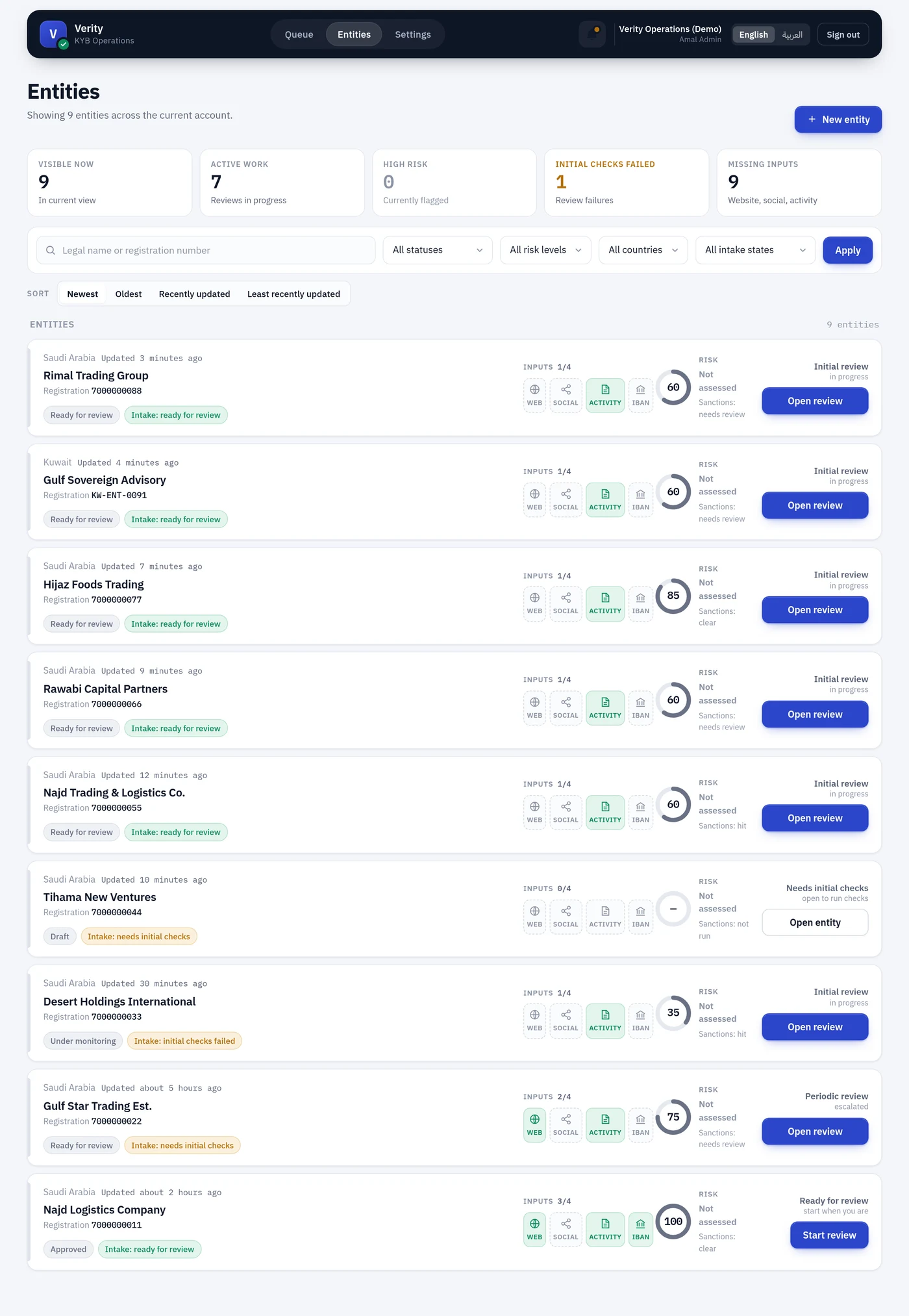
Top row: the five counters
These are counts of the current view, so they change as you filter — not account-wide totals.
| Counter | Counts | Use it to |
|---|---|---|
| Visible now | Entities matching the current search and filters | Sanity-check that a filter did what you expected |
| Active work | Entities with a review open, in_progress or escalated | See how much is genuinely in flight |
| High risk | Entities assessed as high risk | Find the ones the model flagged |
| Initial checks failed | Entities whose latest run of some check type failed | Clear the backlog of broken intake — this one is clickable |
| Missing inputs | Entities missing website, social or business activity | Find files an operator still has to complete |
"High risk" counts assessments, not defaults
risk_level has a database default of low, so this counter deliberately only counts entities that have actually been assessed. An unassessed merchant is not counted as anything.
Filter bar
Search matches legal name or registration number, partial and case-insensitive.
The four dropdowns — status, risk level, country, intake state — combine with AND. Applied filters appear as chips below the bar so a narrow view can never be mistaken for an empty account, and Clear appears once anything is set.
The risk-level filter only returns assessed entities. Filtering on the column alone used to return every never-assessed merchant under "low risk" while each of those rows rendered "Not assessed" in its own band cell — the page claimed a band and denied it in the same breath.
Sort
Newest, Oldest, Recently updated, Least recently updated. Default is Newest — most recently created.
Sorting keeps your search and filters and returns you to page 1. The choice is in the URL, so a sorted filtered view can be bookmarked or pasted to a colleague.
A row
Each row is one merchant, and reads left to right as: who they are → what we hold → where they stand → what to do next.
| Element | Means |
|---|---|
| Country and "Updated" | Where registered, and when the record last changed |
| Legal name, Registration | Identity |
| Status chip | Draft, Ready for review, Approved, Under monitoring … |
| Intake chip | Whether initial checks are done, needed, or failed |
| Inputs n/4 | Operator-supplied fields present: website, social, activity, IBAN |
| Gauge | Verification coverage out of 100 — how much of the file is verified |
| Risk | The assessed band, or Not assessed |
| Sanctions | The screening posture |
| Action button | Open review, Start review, or Open entity — whichever the state allows |
The gauge is coverage, not risk
The number in the ring answers "how much of this file have we verified", on 0–100. The band beside it answers "how risky is what we found". A merchant can score 100 and be high risk. The two are never combined.
Empty states
An account with no entities and a filter that matched nothing look different on purpose — the second tells you a filter is doing it, so a narrow view is never mistaken for an empty portfolio.