Appearance
Team and permissions
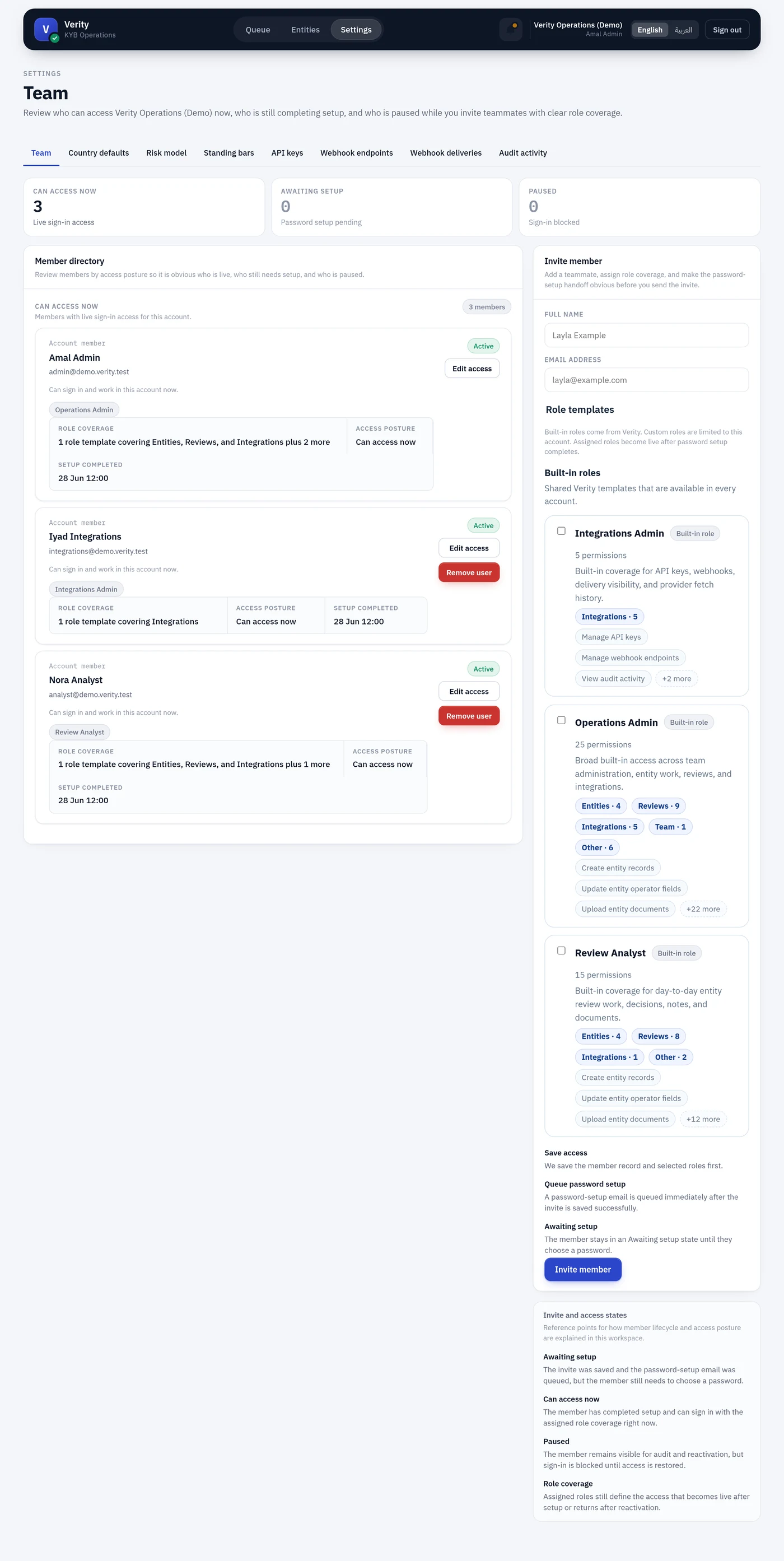
Settings → Team, needing account.team.manage.
Roles first, exceptions second
A team member is granted one or more role templates, and each template carries a set of permissions. Roles describe a job, so access stays reviewable: you audit a handful of templates rather than every individual.
A member can also hold individual permissions on top of their roles, for genuine exceptions — the analyst covering the MLRO's leave. Those are recorded with a reason and shown separately, so an exception never disappears into a role's definition.
The built-in roles
Eleven ship. The governing rule: no role except Operations Admin holds both a maker permission (entity.review.create) and entity.review.approve. One person prepares a file, another signs it off.
| Role | Can | Cannot |
|---|---|---|
| Onboarding Officer | Create merchants, upload documents, run checks, prepare and escalate a review | Approve, reject, assign, adjudicate, bar |
| KYB Analyst | Everything intake can, plus own a queue, assign, and reject | Approve |
| Compliance Officer | Approve or reject a prepared review, escalate, reassign, read the audit trail | Create or edit the merchant, upload its documents, open the review it signs off, adjudicate |
| AML Officer (MLRO) | Decide escalated reviews, clear screening matches, choose the watchlists, bar merchants and people | Author merchant data, move the risk thresholds |
| Compliance Policy Admin | Set country defaults, risk factors and weights, screening lists | Decide any case those rules govern |
| Compliance Auditor | Read cases, decisions, provider evidence, the audit trail, the configuration in force | Write anything at all |
| Integrations Admin | API keys, webhooks, deliveries, provider evidence, audit | See a merchant, a review, or a decision |
| Account Administrator | Invite people, assign roles, read the audit trail | See a merchant; issue API keys |
| Operations Admin | Everything | — |
| Review Analyst | Superseded. Kept so existing holders keep their access | — |
Two notes on the ends of that table.
Operations Admin is break-glass. It is the only role holding maker and checker together, so granting it sets the maker/checker split aside for that person. Use it for bootstrap and emergencies.
Review Analyst predates the split and is frozen. Prefer KYB Analyst plus Compliance Officer for new people. It is not removed because removing approve from it would strip approval authority from whoever currently holds it — and in an account where it is the only role anyone has, would leave zero approvers.
Compliance Auditor is the role you hand an examiner. It holds no .create, .update, .manage or decision permission, and a test enforces that.
The permissions
Twenty-eight, grouped the way the team screen groups them.
Entities
| Permission | Grants |
|---|---|
entity.view | View entities |
entity.create | Create entities |
entity.update | Edit operator-maintained fields, record a declared date of birth |
entity.documents.create | Upload documents |
entity.activity.view | Read an entity's full activity history |
Review work
| Permission | Grants |
|---|---|
entity.review.view | View reviews |
entity.review.create | Create reviews, run party checks |
entity.review.assign | Assign |
entity.review.notes.create | Add notes |
entity.review.refresh | Run entity checks, assess risk |
Decisions
| Permission | Grants |
|---|---|
entity.review.approve | Approve |
entity.review.reject | Reject |
entity.review.escalate | Escalate |
screening.match.adjudicate | Adjudicate matches, decide an escalated review |
Screening lists
| Permission | Grants |
|---|---|
screening_configuration.view | See which watchlists screening runs against |
screening_configuration.manage | Add or remove watchlists |
Risk model
| Permission | Grants |
|---|---|
risk_configuration.view | View risk configuration |
risk_configuration.manage | Move tier thresholds, factors and weights |
country_configuration.view | View country defaults |
country_configuration.manage | Set country defaults and required intake checks |
signing_configuration.view | Inspect which provider obtains a signature in each country |
signing_template.view | Read the documents that can be signed |
signing_template.manage | Write, edit and publish them. A published version can never be changed — see templates |
Standing bars
| Permission | Grants |
|---|---|
denylist.view | See the standing bar list |
denylist.manage | Add and lift bars |
Integrations
| Permission | Grants |
|---|---|
provider_fetch_run.view | View provider evidence |
api_key.manage | Manage API keys |
provider_configuration.view | See the usage code and operator id sent to Elm, and where each came from |
provider_configuration.manage | Change them. These declare to a government registry who is asking and under which entitlement — see Provider settings |
provider_rate.view | See what each provider call is priced at, and which rates this account has set |
provider_rate.manage | Change what a provider call costs. Existing runs keep the rate they were priced under — see Provider rates |
webhook_endpoint.manage | Manage webhook endpoints |
webhook_delivery.view | View webhook deliveries |
Team and audit
| Permission | Grants |
|---|---|
account.team.manage | Manage team access |
audit_event.view | View audit activity |
Countries
Moyasar is licensed in more than one country, and some operators work in one of them only. Countries this member works in on the member form is either every country or a single one, and it applies to every role that member holds.
A member confined to one country sees and decides on that country's merchants only. Their entity list, review queue and provider evidence are all filtered to it, and a merchant in another country is refused rather than hidden ambiguously.
Account-wide settings need authority in every country. Somebody entrusted with Bahrain does not acquire the ability to change the risk model for everyone — with one deliberate exception: a country-scoped admin can tune their own country's defaults under Country defaults, and no other country's.
API keys are not country-scoped
An API key with the account_full scope bypasses the permission model entirely, so it reaches every country regardless. Treat one as a cross-border credential.
Individual permissions
On a member's page, Individual permissions lists anything granted to them directly, with where it applies, why, who granted it, and when it expires.
Three rules hold, enforced in the model rather than the form:
- You cannot grant what you do not hold — in the country you are granting it for.
account.team.manageandapi_key.manageare never grantable individually. The first lets the recipient re-grant themselves anything; the second mintsaccount_fullkeys that bypass the model. Both stay with roles, where handing them over is a visible act.- A reason is required. A permission held outside any role is the first thing an auditor asks about, and "who decided, and why" has to be answerable without archaeology.
An expiry is honoured on read: a lapsed grant stops working on the day, whether or not anything has run since.
If a member needs the same exception permanently, change their role instead. That is what roles are for.
What they can decide
What they can decide on a member's page answers the question directly — can this person approve, reject, escalate, adjudicate, bar, manage the team — and names the role or grant that carries each one:
Approve reviews — Yes, via Compliance Officer
Where two sources grant the same authority, both are named. That matters when you are removing one: taking away a role that is not the only source changes nothing.
Inviting
Invite from the team screen with a name, an email address, the countries they work in, and at least one role. The member receives a link to set their own password; Verity never shows or emails a password.
An invitation link is valid for one day. Password resets keep a much shorter window, because a reset is self-service and the person is waiting on it, while an invitation is pushed at somebody who may not read their mail until tomorrow.
If it expires, use Resend invitation on the member's card. It issues a fresh link and restarts the clock; the earlier link keeps working until it lapses on its own. Resending is refused for a member who has already set a password — send a password reset instead — and for a paused member, whose invitation could not work anyway.
Reviewing access
Deactivating a member keeps their history and revokes their sessions immediately. Removals are deactivations, not deletions: who decided what stays on the record.
Every access change is written to the audit trail — roles changed, invitations sent and resent, individual permissions granted and revoked, each with the actor and the reason where one was required.